Quick answer Checked November 2026
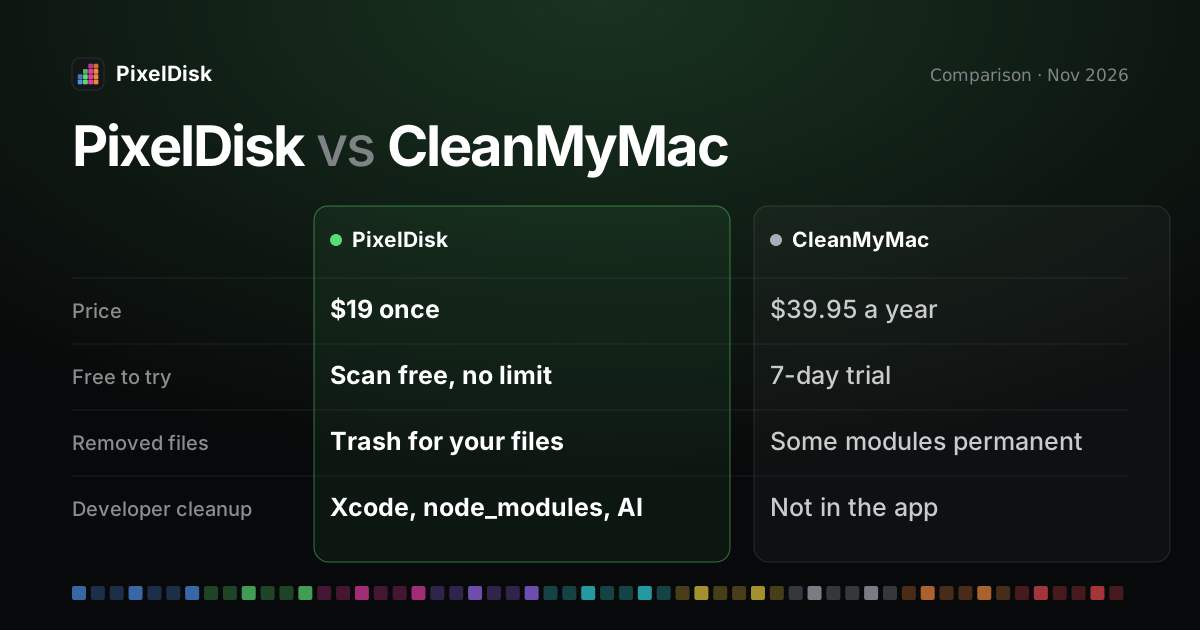
CleanMyMac is MacPaw’s all-in-one Mac cleaner, $39.95 a year for one Mac, with malware and speed tools. PixelDisk costs $19 once and only frees disk space, with a cost label on every item and developer cleanup.
- PixelDisk$19
- CleanMyMac · Yearly × 3$119.85
Pick PixelDisk if
- Disk space is the problem you have
- You want to keep your files in the Trash by default
- You want one payment, no subscription
Pick CleanMyMac if
- You want malware scanning and speed tools
- You need the menu bar health monitor
- You already pay for Setapp
PixelDisk has two modes. Safe (the default) moves your files to the Trash, where you can put them back, and deletes caches and build files because apps recreate them. Full deletes everything at once after one confirmation.
PixelDisk is a CleanMyMac alternative for people who only need disk space back and don’t want a subscription. It costs $19 once, while CleanMyMac costs $39.95 per year for one Mac (MacPaw, checked November 2026). In Safe mode, PixelDisk sends your own files to the Trash and logs every removal, so you can put them back.
The short version
CleanMyMac is a broad Mac care suite: junk cleanup, malware protection, memory and CPU tools, an uninstaller, an app updater and a disk map called Space Lens (MacPaw). PixelDisk does one job: it shows where your disk space went and removes what is safe to remove. It is built with developer folders in mind, such as Xcode, Docker and local AI models.
If you want one app that does everything, CleanMyMac covers more. If you want disk space back, a one-time price and a History, PixelDisk is the narrower tool.
Comparison
| PixelDisk | CleanMyMac | |
|---|---|---|
| Price model | One-time | Subscription, one-time, or Setapp |
| Price, 1 Mac | $19 | $39.95/year; one-time $89.95–$119.95 (not confirmed) |
| Free tier | Scan and explore, no time limit | 7-day trial |
| Disk map | Pixel bar of 9 categories, folder treemap | Space Lens bubble map |
| Developer cleanup in the app | Xcode DerivedData, DeviceSupport, simulators (direct edition), Docker by kind and VM disks (direct edition), node_modules/target/build, AI models, git worktrees |
Not listed for the app; separate CleanMyMac CLI beta |
| Where removed files go | Safe mode: your files go to the Trash; caches and build files are deleted (they rebuild) | Large & Old Files and Duplicates delete permanently, bypassing the Trash (MacPaw help, 2); other modules not stated |
| Undo / history | History log; put back while in the Trash | Not stated on the product page |
| Network and account | No account, no analytics; only an update check you can turn off | Not compared here |
| macOS | 14 or later | 11 or later |
CleanMyMac prices and features as listed by MacPaw and Setapp, checked November 2026. Setapp lists CleanMyMac on its own at $9.95 per month, and Setapp plans from $14.99 per month (Setapp). MacPaw’s store page lists the $39.95 yearly plan but no one-time price, so the one-time range comes from secondary sources and is marked not confirmed.
Where PixelDisk is different
One price, once
PixelDisk is free to scan. Cleaning is unlocked with a $19 one-time purchase (pricing). There is no renewal.
Your files go to the Trash
In Safe mode, your own files go to the Trash, while caches, logs and build files are deleted at once. PixelDisk writes every removal to a History list, where you can put back items still in the Trash. Space from trashed files returns only after you empty the Trash.
Each item says what it costs
PixelDisk labels items with the price of removing them, such as “Next build is slower” for DerivedData or “Downloads again” for an Ollama model. It skips files of running apps and files that are open.
Developer folders in the app
MacPaw released a separate CleanMyMac CLI in July 2026 as a free public beta. It cleans Xcode caches, package manager caches, Docker and node_modules from Terminal (MacPaw, AlternativeTo). PixelDisk shows the same kind of items in its window, with sizes, next to the rest of the disk. See the guides on Xcode DerivedData, Docker.raw and local AI models.
What PixelDisk doesn’t do
- No malware scan.
- No RAM, CPU or “speed up” tools. It doesn’t touch login items or memory.
- No app updater.
- No Windows version. macOS 14 or later only.
- The App Store edition is sandboxed. It sees only your Home folder and can’t uninstall apps. The Uninstaller, simulators, System Data breakdown, backups, Time Machine snapshots, VM disks and Docker cleanup are in the direct download edition.
- It focuses on the startup disk, not external drives.
Other options
- Mole is a free, open-source command-line cleaner (
mo), with a separate Mac app at $19 one-time for 2 Macs. Itsmo purgecleansnode_modules,targetand build folders. Itscleanandpurgecommands delete permanently, whileuninstallandanalyzeuse the Trash (GitHub, Mole). - MacCleaner Pro by Nektony costs €36.24 per year, €13.56 per month or €77.97 one-time for one Mac, with a 2-day trial (Nektony). It has no developer cleanup.
- DaisyDisk is a $9.99 disk map. See DaisyDisk alternative.
Who should stay with CleanMyMac
Stay with CleanMyMac if you use its malware protection, app updater or performance tools, or if you already pay for Setapp and use other apps in it. It also supports macOS 11, while PixelDisk needs macOS 14. If you want one app to handle general Mac care, PixelDisk is not that app.
Sources
Prices and features checked November 2026.
- MacPaw, CleanMyMac: https://macpaw.com/cleanmymac
- MacPaw, CleanMyMac upgrade store: https://macpaw.com/store/cleanmymacupgrade
- Capterra, CleanMyMac pricing: https://www.capterra.com/p/232745/CleanMyMac-X/pricing/
- Setapp, CleanMyMac: https://setapp.com/apps/cleanmymac
- MacPaw, CleanMyMac CLI: https://macpaw.com/news/cleanmymac-cli
- AlternativeTo, MacPaw launches CleanMyMac CLI: https://alternativeto.net/news/2026/7/macpaw-launches-cleanmymac-cli-to-clean-developers-caches-leftovers-and-other-junk-files/
- Mole on GitHub: https://github.com/tw93/Mole
- Mole for Mac: https://mole.fit/
- Nektony, MacCleaner Pro pricing: https://nektony.com/mac-cleaner-pro/buy