Quick answer Checked November 2026
The right Mac disk cleaner depends on the job. DaisyDisk ($9.99) and GrandPerspective (free) map a disk, AppCleaner (free) removes apps, CleanMyMac ($39.95 a year) adds malware and speed tools, and PixelDisk ($19 once) clears disk space with a cost label on every item.
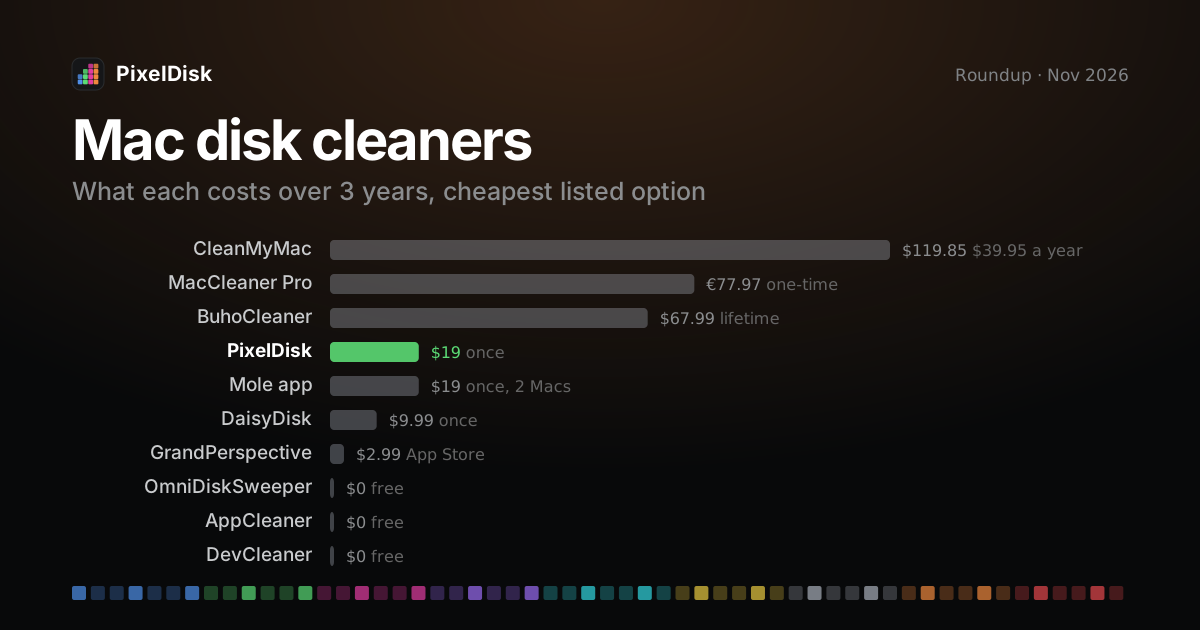
- CleanMyMac$119.85 $39.95 a year
- MacCleaner Pro€77.97 one-time
- BuhoCleaner$67.99 lifetime
- PixelDisk$19 once
- Mole app$19 once, 2 Macs
- DaisyDisk$9.99 once
- GrandPerspective$2.99 App Store
- OmniDiskSweeper$0 free
- AppCleaner$0 free
- DevCleaner$0 free
Euro prices are shown as listed, not converted.
PixelDisk has two modes. Safe (the default) moves your files to the Trash, where you can put them back, and deletes caches and build files because apps recreate them. Full deletes everything at once after one confirmation.
Which one to use: GrandPerspective or OmniDiskSweeper for a free map, AppCleaner for removing apps, DaisyDisk for a one-time visual map, CleanMyMac for a full subscription suite, DevCleaner for Xcode only, and PixelDisk ($19 once) for disk cleanup that labels costs and sends your files to the Trash by default.
PixelDisk is our product, so read the picks below with that in mind. We name another app wherever it fits a need better.
Comparison
| App | Price model | Price | Free tier | Deletes to Trash or permanently | Developer cleanup | Best for |
|---|---|---|---|---|---|---|
| PixelDisk | One-time | $19 | Scan and explore, no time limit | Safe mode: your files go to the Trash; caches and build files are deleted (they rebuild); History log | Xcode, node_modules/target/build, AI models, git worktrees; simulators, Docker, VM disks (direct edition) |
Startup disk cleanup with costs labeled and a History |
| CleanMyMac | Subscription, also one-time and Setapp | $39.95/year, 1 Mac; one-time not confirmed | Free trial | Large & Old Files and Duplicates: permanent (MacPaw help); others not stated | Not in the app; separate CLI beta | All-in-one Mac care suite |
| DaisyDisk | One-time | $9.99, up to 5 personal Macs | Free trial with scanning | Permanently | No | Visual map of any disk |
| MacCleaner Pro | Subscription or one-time | €36.24/year or €77.97 one-time, 1 Mac (USD not confirmed) | 2-day trial | Trash by default, Removal History | Not listed | Bundle of cleanup and “speed” tools |
| Mole | Free CLI; one-time Mac app | CLI $0; app $19 for 2 Macs | CLI fully free; app scans free, each paid tool runs twice | Mixed: CLI clean/purge permanent; uninstall and analyze to Trash; app caches permanent by default |
Yes: mo purge for build folders, dev and AI tool caches |
Terminal users and scripts |
| OmniDiskSweeper | Free download | $0 (no price listed) | Whole app | To the Trash | No | Simple list of the largest files |
| GrandPerspective | Free, or paid App Store copy | $0 on SourceForge; $2.99 on the App Store | Whole app | Not stated | No | Free treemap |
| AppCleaner | Free download, donations | $0 (no price listed) | Whole app | Not stated | No | Removing apps and their leftovers |
| CCleaner for Mac | Free, or yearly subscription | US price not confirmed (reviews list about $44.95/year) | Clutter, duplicates, uninstall, startup items | Not stated | Not listed | Browser privacy cleaning across Mac, PC and Android |
| BuhoCleaner | Subscription or lifetime | $39.99/year or $67.99 lifetime, 1 Mac (on sale for $17.99 / $25.99 when checked) | Free download; limits not stated | Not stated | Xcode cache only | Low-cost suite with a lifetime option |
| DevCleaner for Xcode | Free, optional tips | $0 (tips $1.99–$9.99) | Whole app | Permanent (per its source code) | Xcode only: DerivedData, Archives, DeviceSupport, docs cache, logs | iOS developers who only need Xcode cleanup |
“Not stated” means the vendor’s own pages don’t say, not that the app is unsafe.
Free map of your disk
GrandPerspective is the honest pick. It draws a treemap, is free from SourceForge and costs $2.99 on the App Store for the same app (GrandPerspective). OmniDiskSweeper is the simpler option: a free list of files from largest to smallest that sends what you pick to the Trash (Omni Group). If $9.99 is fine and you want a polished map of external drives too, DaisyDisk is the one. PixelDisk scans for free as well, but it only maps the startup disk. See the GrandPerspective, OmniDiskSweeper and DaisyDisk comparisons.
Uninstall apps
AppCleaner is the honest pick. It is a free download: drop an app on it and it finds the files the app left behind (FreeMacSoft). PixelDisk has an Uninstaller with app leftovers, but only in the direct download edition; the Mac App Store edition can’t uninstall apps. See the AppCleaner alternative page.
Developers
It depends on how much of your stack you need covered.
- Xcode only, free: DevCleaner for Xcode clears DerivedData, Archives, Device Support and old logs (App Store). Its author advises a backup before use (GitHub).
- Terminal and scripts: Mole’s free CLI removes
node_modules,target,buildand similar folders withmo purge, with a--dry-runpreview (GitHub). Those deletions are permanent, and PixelDisk deletes build folders at once in Safe mode too. - Everything in one window, with a History: PixelDisk lists Xcode DerivedData, DeviceSupport,
node_modules/target/build, git worktrees and local models from Ollama, LM Studio and Hugging Face. The direct edition adds simulators, Docker by kind and VM disks. In Safe mode, build folders and caches are deleted at once because they rebuild; AI models and other files you own go to the Trash.
See the DevCleaner and Mole comparisons, and the guides on Xcode DerivedData, Docker and AI models.
Subscription suite
CleanMyMac is the honest pick if you want one app for junk, malware, memory, updates, an uninstaller and a disk map. It starts at $39.95 per year for one Mac (MacPaw). MacCleaner Pro is a bundle of cleanup and speed tools from €36.24 per year (Nektony). BuhoCleaner is cheaper and offers a lifetime license (Dr.Buho). CCleaner for Mac adds browser cleaning and covers PCs and Android on its Plus plan. PixelDisk is not a suite: it only frees disk space. See the CleanMyMac, MacCleaner Pro, BuhoCleaner and CCleaner comparisons.
Safe by default
PixelDisk is the fit here. In Safe mode, the default, your own files go to the Trash and are logged in History, where you can put them back. Caches and build files are deleted at once because they rebuild, and Full mode deletes everything. It also skips files of running apps, open files and anything marked Keep. OmniDiskSweeper also sends files to the Trash, but has no history or labels. DaisyDisk deletes permanently (DaisyDisk), and Mole’s clean and purge are permanent. PixelDisk’s Safe mode deletes caches and build files at once as well, so the difference is where personal files go. Try PixelDisk for free and see pricing.
How we compared
We checked each app’s own website or App Store page in November 2026 for price, free tier, deletion behavior and developer cleanup. Where a vendor page didn’t state something, the table says “not stated” or “not confirmed” instead of guessing. CCleaner’s shop showed only local-currency prices to us, and MacCleaner Pro lists euros. Sale prices change often, so check before buying. PixelDisk is our product.
Sources
Prices and features checked November 2026.
- CleanMyMac: https://macpaw.com/cleanmymac
- DaisyDisk: https://daisydiskapp.com/
- MacCleaner Pro pricing: https://nektony.com/mac-cleaner-pro/buy
- Mole: https://mole.fit/ and https://github.com/tw93/Mole
- OmniDiskSweeper: https://www.omnigroup.com/more
- GrandPerspective: https://grandperspectiv.sourceforge.net/
- AppCleaner: https://freemacsoft.net/appcleaner/
- CCleaner for Mac: https://www.ccleaner.com/ccleaner-mac
- BuhoCleaner pricing: https://www.drbuho.com/buhocleaner/buy
- DevCleaner for Xcode: https://apps.apple.com/us/app/devcleaner-for-xcode/id1388020431 and https://github.com/vashpan/xcode-dev-cleaner